 |
|
|
ICQ# 16388743
|
HARD DRIVE 101
There are many companies out there who offer excellent hard drives, so choose wisely. Here is a list of a few companies that are my favorites: - Maxtor - Quantum - IBM - Seagate
After you made your decision on your hard drive, you are ready to install…. Installing Your Hard Drive
The Unpacking…Assuming that you bought the hard drive retail, once you bring home your hard drive and open up the box there should be foam protecting the hard drive (the drive will be in an anti-static bag for protection). You will also find a manual/instruction booklet, 3.5 floppy disk (some hard drives do not have one), IDE (Integrated Device Electronics) cable, brackets, and screws. (Note: Not all hard drives may come with the above mentioned materials). Before you take the hard drive out of its bag, make sure you don’t have static electricity in your body: especially if you are in a carpeted area. To make sure, touch something metal to clear yourself of any static electricity. When you open the bag, try not to touch the bottom (the green board area) of the hard drive too much you may fry something (l would know this first hand).
The Installation… Now you have it all unpacked and ready to go and must decide whether or not you are going to use your hard drive as your master or slave. For people who already have a hard drive in your computer you might want to use the new drive as your slave, but if your new hard drive is faster than your current one you will want the new one as your master. The reason for this is because if you have currently an ATA/66 and you bought an ATA/100 and used the ATA/100 as your slave the slave will be running the speed of the ATA/66. So it is recommended putting the faster one as your master. For people only using this drive you must have it as your master drive. Now the way to make your drive a master or slave is as follows:
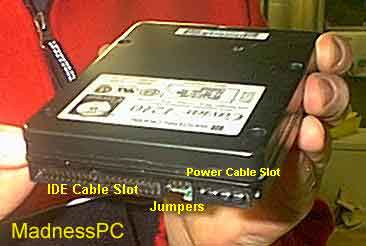
If you look at the back of the hard drive you will notice three different areas; the first is the IDE cable slot which is a long strip with a lot of small pins, the next is the power cable slot which has four chubbier pins, so this means the last slot on the hard drive is where the jumpers are. Different drives have it in different areas so you just have to find it.
|
News Updated every 15 minutes, 365 days a year
Reference MadnessPC Monthly Giveaway Page
|
Send mail to merc@merc100.com with questions or comments about this web site. Got news? send to news@merc100.comCopyright © 2000-2001 MERC100.com. Privacy Policy. Most the information contained on this site is copyrighted material. It is illegal to copy in this information without the written consent of the appropriate owner(s). MERC100.com is not responsible for damages that the information on this site may cause to your components / system etc...Logo design by Janne Puonti |